



Consult "Sole 24 Ore" newspaper
How to find the link
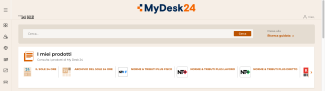
Il Sole 24 Ore is available through the MyDesk24 digital platform.
To access it, please follow the steps below:
- Log in to Eureka.
- Enter “mydesk24” (or “bancadati24”, or “Sole 24 Ore”) in the search field and click Search.
- If the database does not appear among the search results, we recommend applying the “Website” filter from the sidebar. This filter helps reduce irrelevant results.
- Click “View now” to access the resource (enter your institutional user and password if prompted).
Consult the database
To access the newspaper and its archive, locate the "I miei prodotti" (i.e “My products”) section, where you will find two links:
- IL SOLE 24 ORE, which allows you to consult the current day’s issue and any supplementary materials.
- ARCHIVIO DEL SOLE 24 ORE, which enables you to search the newspaper’s archive from 1984 onwards. Scanned editions of the newspaper from 1920 are also available.
Each issue of the newspaper also provides access to any related supplements.